Samsung Video Library

Cover art

You can browse and play video contents. 
It also provides clear and straightforward layout, when you select Samsung Video Player for playing video clip, 
it may provides seamless user experience. 

[Major Features] 
■ Viewing 
□ Videos / Folders Tab
□ List / Grid View
□ Search
□ Sort by - Title / Time
□ Sort by Order
- Ascending / Descending
□ Support pinch to zoom
- Using multi-touch you can enlarge thumbnails
□ File Tag (360 video, DRM, Slow motion and Hyperlapse video)
□ Resume position card
- It shows the last video you played
   Samsung Video Library- screenshot
■ Managing
□ Provides Editor/Delete on video content(You can download Video Editor) 
□ You can share video content with friends via various sharing functions that device supports 
- Email, Bluetooth, Wi-Fi Direct, YouTube ... 
□ You can select and move contents if multiple folder exists
□ You can rename a file
□ You may select video content then delete or make it private**
** - 'Private' functionality available if the device supports any of the following 
: Secure Folder, Private Mode or KNOX service.
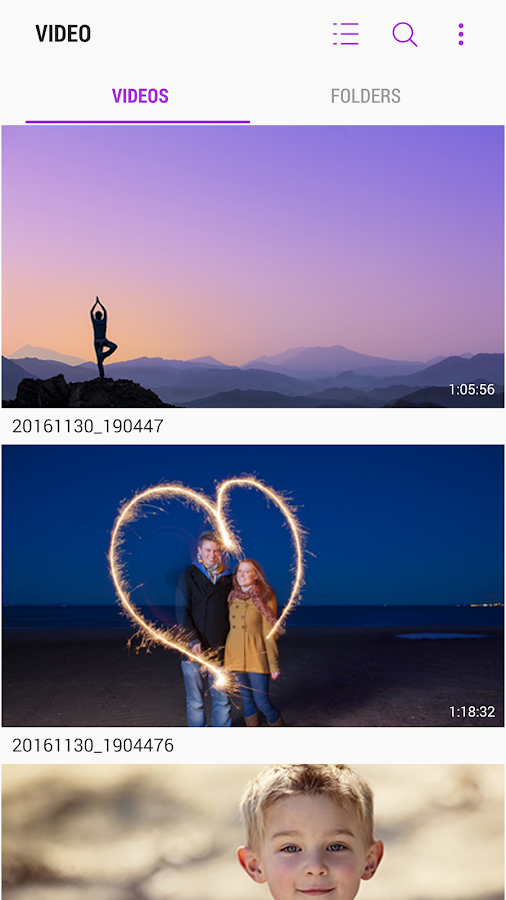
   Samsung Video Library- screenshot
* Supported device : Samsung Galaxy Series (some models are not supported due to hardware dependency)

*********Regarding the App Access Privilege*********
To provide quality service, the app needs below app access privilege. 

You can use basic function of app without consent of Optional App access privilege.

- Mandatory Access Privilege

. Storage: The purpose is to access/manage local video files.


WHAT'S NEW

[1.4.01.8]
1. New features
* Sort by Order : Ascending / Descending option
* Resume position card : It shows the last video you played.
* Now you can select and move contents if multiple folder exists.
* Now you can rename a file.
2. Bug fix
3. Supported devices
- Galaxy Note8 series only
Link download: Android

Comments

Popular posts from this blog

S Note

[Notice] Please use synchronization features for keeping your data safely. [S Note] S Note is a note taking application which allows you to efficiently create, edit and manage notes. It provides a number of user-friendly features that differentiates it from other note taking applications. This includes easy file management with the ability to create categories and copy, move or delete files from within the application. It also supports interactive multimedia functions and allows you to draw and write using S Pen. Features : - Freehand writing and drawing using S Pen or Finger, with various pre-defined pens and styles - Insert charts, sketches, pictures, voice notes and set custom background in notes - Supports up to 500 pages in a single note - Supports searching of text(handwritten and keypad input) with different filters - Categorization of notes - Ability to print, export and share note as spd/image/pdf/text file - Import and edit pdf files as notes - Sync notes between ...

Samsung Health

Samsung Health provides core features to keep up your body fit and healthy. It will record and analyze your daily activities and habits to help maintain successful diet and lead healthy lifestyle. Whether you walk or run, hike or bike, play indoor or outdoor sports, you can add and track the various physical exercises and activities in a single step using the various built-in trackers. Samsung Health helps to create a balanced lifestyle pattern by recording a variety of information like your food, caffeine and water intake details. Provide your daily snacks, food, water and caffeine intake and track your diet and weight on the go while staying comfortable using the sleep & stress tracker. Manage health and environmental records such as heart rate, blood pressure, blood glucose levels, stress, weight & SpO₂ using built-in sensors and third party devices. Trackers enable user to easily and quickly check meaningful data based on user preferences. The intuitive charts, hel...

Mozilla Firefox Select Days To Say Goodbye To Windows XP, Windows Vista

Firefox is the name of the latest statement will stop supporting Windows XP OS 2, Windows Vista the next time. For those who still cling to Windows XP and Vista , the list of companies willing to support the operating system is becoming increasingly fragile.  Next Microsoft, Google, Mozilla also announced on end support on the 2 Firefox OS. Yesterday, the company announced that it would terminate the program "Firefox Extended Support Release" in June 2018 and will not release any updates or patches for Firefox on Windows XP and Vista from the moment there. Microsoft ended support for Windows XP in 2014 as a move to urge users to upgrade to newer versions of Windows.  Recently, Windows Vista also has followed the fate of Windows XP (earlier this year). 2015, Google announced that Chrome - the most popular web browser will stop supporting the OS 2 in 2016 (this announcement also mentioned some old version of MacOS). According to the latest figures fr...